
Timesheet Tracker
Cross-platform Web App
What?
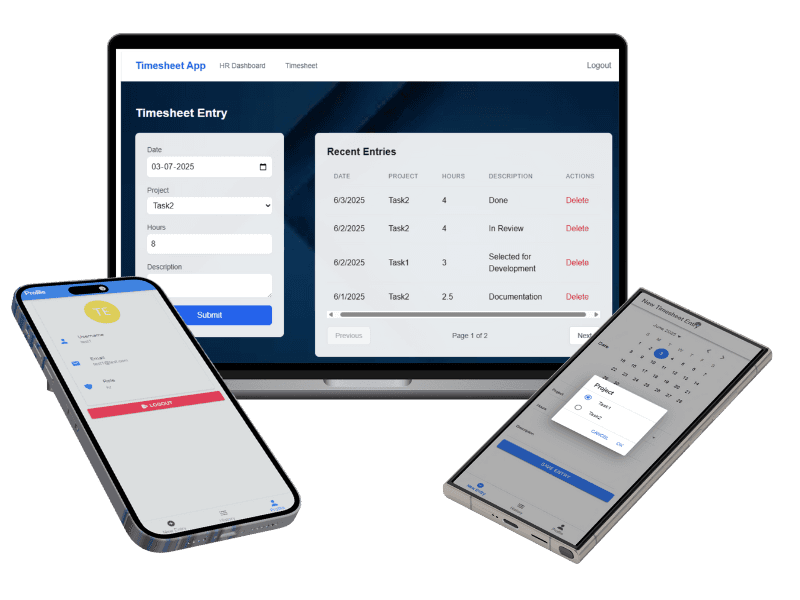
A secure, cross-platform timesheet management system with role-based dashboards tailored for HR teams and employees. It includes a responsive web app and a mobile app with real-time data sync, enabling seamless time tracking, task management, and user role administration.
Why?
Manual timesheet processes are error-prone and inefficient. This system was designed to:
— Streamline time tracking across web and mobile
— Provide HR teams with centralized control over task assignments and user roles
— Ensure secure and scalable access with real-time synchronization
Tech Stack
Backend: NestJS, MongoDB, JWT, bcrypt
Web App: Next.js, TypeScript, Tailwind CSS
Mobile App: Ionic ReactDeployment: Vercel, Railway (IaaS), MongoDb Atlas (DB ingress and egress)
— Authentication & Access Control: JWT-based login with support for both email and username, encrypted passwords via bcrypt, and strict role-based route protection.
— Dashboards:
HR Dashboard: Register/manage users, assign tasks, and monitor activities.
Employee Dashboard: Create/view timesheets, track task progress.
APIs: Custom RESTful endpoints support CRUD operations, task management, and user data retrieval.
System Architecture: Modular NestJS backend, secured API routes, and integrated frontend via protected endpoints.
State Management: AuthContext for global auth state handling (React Context API).
Mobile Features: Optimized for iOS/Android with tab navigation, mobile-first forms, and conditional UI rendering based on user roles.
Design Process Section
1. Research & Problem Understanding
Identified inefficiencies in manual timesheet processes (spreadsheets, email submissions).
Defined two main user groups:
Employees → need a simple, quick way to log hours/tasks.
HR/Admins → need oversight, approvals, and role management.
2. User Flows
Sketched high-level flows to clarify roles:
Employee logs timesheet → HR reviews → Status updated.
HR registers users → Assigns tasks → Tracks submissions.
3. Wireframes (Low-Fidelity)
Started with quick grayscale wireframes in Figma.
Focused on:
Input simplicity for employees (minimal fields, mobile-first).
Dashboard clarity for HR (list view of employees + timesheets).
4. UI Design (High-Fidelity)
Built responsive UI mockups using Figma components for consistency.
Used Tailwind-style utility classes to align with dev stack.
Designed role-based visibility (e.g. HR-only actions hidden from employees).
Check out the Figma Prototype here!
5. Prototype & Testing
Connected screens in Figma for interactive walkthrough.
Tested flows with peers → refined dropdowns, form validation hints, and error states.
Iterated on mobile layouts to improve usability with thumb reach zones.
🔐 Security
Password encryption, token-based session management
Input validation, XSS protection, and CORS
Role-based UI visibility and backend enforcement
Firewall and network configuration for REST API
🚀 Highlights
Created real-time synced dashboards for HR and employees
Built secure, role-aware access flow across web and mobile
Implemented debouncing in timesheet entries to reduce server load
Designed responsive UI using Tailwind CSS and Ionic components
🔮 Future Enhancements
Biometric login for mobile
Push notifications for task updates
Data dashboards and analytics for HR teams



Links.
© 2025 • Snehasini M Antonious